An online bill generator is a browser-based tool used to create bills, invoices and receipts by filling in editable fields. It helps users prepare structured PDF records for sales, services, reimbursements, rent, travel, food, medical, internet and many other billing needs.
What is an Online Bill Generator?
An online bill generator is a digital tool that helps you prepare bills from ready-made templates. You select the bill type, enter the required details, preview the document and download the final file as a PDF.
It is useful because most billing problems are not about design. They are about missing fields, unclear totals and inconsistent records. A guided format keeps the document organized from the beginning.
Who Needs an Online Bill Generator?
An online bill generator is useful for shop owners, freelancers, service providers, landlords, employees, office teams, travel users and small businesses. It also helps individuals who want organized payment records for personal use.
For example, a shop may need a product bill, a tenant may need a rent receipt, a traveler may need a hotel bill, and a freelancer may need a service invoice. One platform with multiple templates can handle different use cases more easily.
Why Businesses Prefer Online Bill Creation
Manual billing often depends on old files, copy-paste formats and handwritten notes. These methods may work once, but they become messy when records grow. Online bill creation gives every document a cleaner structure.
A consistent PDF bill is easier to share with customers, attach for reimbursement, store in folders and find later. It also makes your business look more organized, even if you are working alone or running a small local service.
Common Bill Types You Can Create
Depending on your need, you can create fuel bills, restaurant bills, hotel bills, cab bills, rent receipts, internet bills, medical bills, GST-style invoices, recharge bills, school receipts, donation receipts and more.
The right template matters. A rent receipt should not look like a restaurant bill, and a cab bill should not look like a general service invoice. Choosing a relevant format makes the final PDF more natural and easier to understand.
How OnlineBillMaker Helps
OnlineBillMaker is designed for users who want quick billing records without complex software. The tool focuses on editable templates, live preview and clean PDF downloads across many bill categories.
You can create bills for business, office, travel, service and personal record needs. The workflow stays simple: choose the template, add details, preview, and download.
Steps to Use an Online Bill Generator
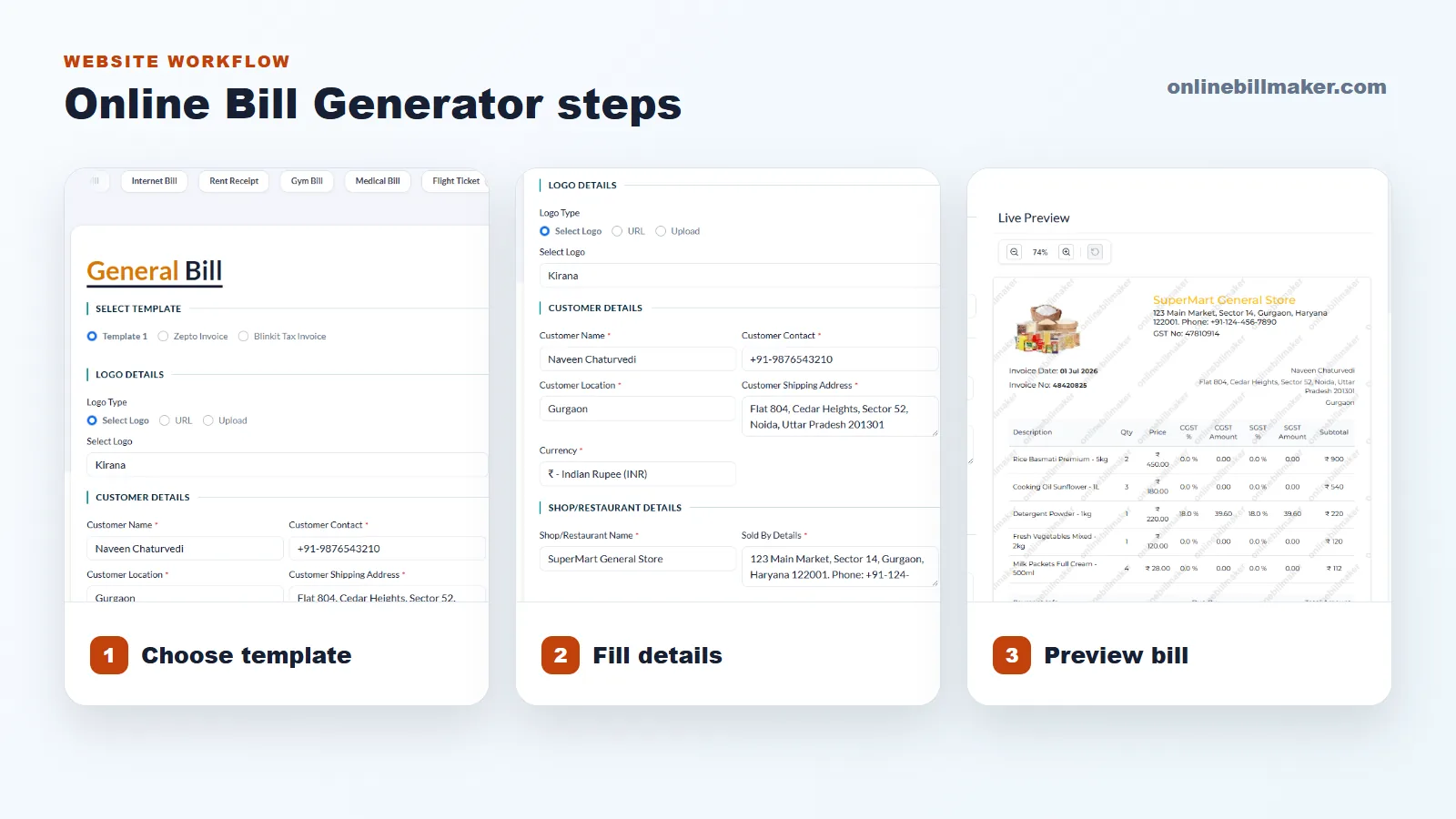
1. Select the bill category that matches your requirement.
2. Add seller, customer or recipient details as needed.
3. Enter items, services, dates, amounts, payment mode and notes.
4. Review the live preview to catch wrong spelling, dates or totals.
5. Download the bill as a PDF and save it with a proper file name.
Tips to Keep Bills Organized
Create a folder system by month, customer or bill type. Rename each PDF clearly instead of leaving files as bill.pdf or final.pdf. This habit saves time when you need to search old documents.
If you create similar bills often, keep commonly used details ready. Business name, address, phone number, payment notes and regular item names can be reused carefully after checking the current document.