A free invoice generator is an online tool that helps users create invoices by entering business details, customer information, items, rates, totals and payment notes. It is useful for freelancers, consultants, small businesses and service providers who need quick PDF invoices for everyday records.
What is a Free Invoice Generator?
A free invoice generator is a simple online billing tool that gives you a ready-made invoice layout. Instead of designing a file in Word, Excel or any other editor, you select a format, add the required details and create a downloadable PDF.
The main purpose is speed with structure. A good invoice clearly shows who is billing, who is being billed, what work or products are included, how the amount is calculated, and how the invoice can be saved for records. For many users, this is enough to replace repeated manual formatting for basic billing work.
Who Should Use a Free Invoice Generator?
A free invoice generator is useful for freelancers, small businesses, shop owners, consultants, agencies, home service providers, online sellers and anyone who sends payment requests to customers. It also works well for first-time business owners who do not want complex accounting software for simple invoice creation.
Freelance writers, designers, developers, tutors, repair services and local vendors can use it to prepare neat documents for project fees, product sales, monthly retainers, one-time jobs or service charges.
Why PDF Invoices Matter
PDF is one of the easiest formats to share because it keeps the layout stable across phones, laptops and printers. A PDF invoice is easier to email, upload, print and store than a message with scattered payment details.
When customers receive a clear invoice, they can check the amount, item list and payment notes without asking for repeated clarification. This makes payment follow-up smoother and improves the way your business records look over time.
Important Details to Add Before Creating an Invoice
Keep your business name, customer name, invoice number, invoice date, item or service list, quantity, rate, total amount, payment terms and notes ready before you begin. If you use a logo, registration number or address, keep those details ready too.
A clean invoice depends on accurate input. Wrong dates, unclear item names and missing totals can make even a good template look unreliable. Review the document once before downloading the final PDF.
How OnlineBillMaker Helps
OnlineBillMaker keeps invoice creation simple. You can choose a suitable bill or invoice format, type the details, check the preview and download the PDF. The process is built for users who need practical billing records without wasting time on layout adjustments.
The tool is especially helpful when you create invoices regularly and want a similar structure every time. Consistent invoice formatting makes old records easier to understand and find later.
Steps to Create a Free Invoice Online
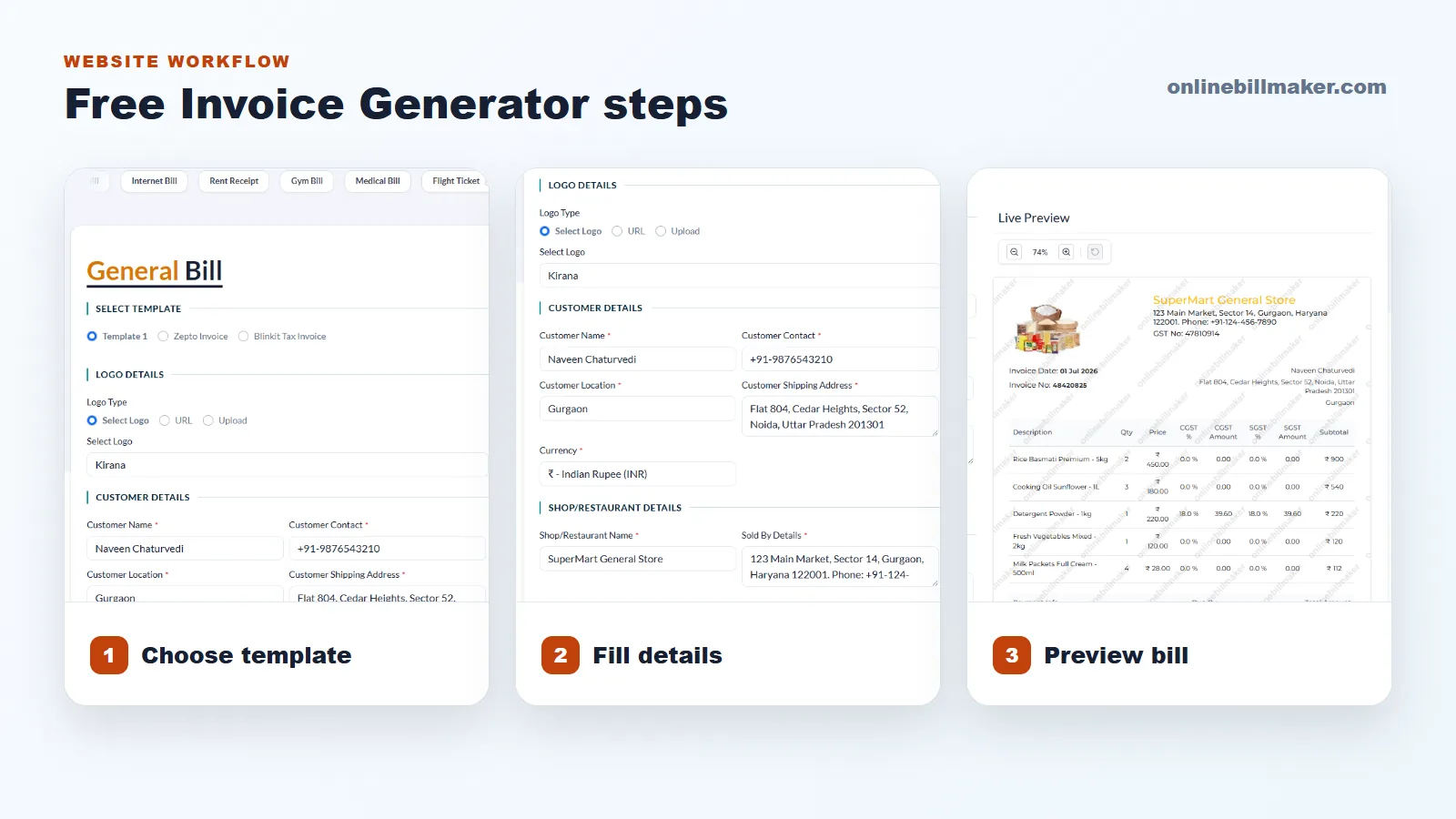
1. Choose the invoice template that matches your billing purpose.
2. Add your business name, address, contact details and logo if required.
3. Enter the customer name, invoice number and invoice date carefully.
4. Add items or services with quantity, rate, taxes or extra charges where needed.
5. Check the live preview for spelling, totals, dates and layout issues.
6. Download the invoice as a PDF and save it with a clear file name.
Best Practices for Better Invoice Records
Use short item names, clear payment notes and a simple file naming system such as ClientName-InvoiceNumber-Month. Avoid reusing an old invoice without checking every field again.
If you bill the same client often, keep a small checklist of the details they usually need. This saves time and reduces corrections in future invoices.