A GST bill format is a structured layout used to present seller details, buyer details, GSTIN fields, invoice number, date, items, values, tax breakup and total amount. It helps organize invoice information, but tax-related documents should be reviewed before any official use.
What is a GST Bill Format?
A GST bill format is the layout used to arrange GST-style billing details in a clear order. It usually separates seller information, buyer information, invoice details, item details, value fields, tax breakup and total amount.
A good format does not make the document compliant by itself. It simply gives the information a proper structure so the user, customer or accounts team can review it more easily.
Who Needs a GST Bill Format?
A GST bill format can be useful for business owners, billing executives, accountants, office admins, consultants, service providers, product sellers and anyone preparing structured business billing records.
It is especially useful when you want a consistent format for repeated invoices instead of creating a different layout every time.
Why Format Matters in GST-Style Billing
When billing details are scattered, even correct information can look confusing. A proper format makes names, numbers, item rows and totals easier to read.
For customers and accounts teams, a clean bill reduces correction requests. For businesses, consistent formats make old records easier to search, compare and store.
Important Fields to Organize
Keep seller name, business address, GSTIN field, buyer name, invoice number, date, item or service details, quantity, rate, taxable value, tax breakup, total amount and payment notes in a clear sequence.
If you are unsure about any tax value, GST rate, e-invoicing requirement, reverse charge or reporting detail, ask your accountant or CA before relying on the document.
How OnlineBillMaker Helps
OnlineBillMaker gives users a simple way to create GST-style bill formats with editable fields and PDF download. You can fill the details, see the live preview and make corrections before saving the file.
This is useful for preparing neat drafts and organized records. For tax, legal, government or official purposes, every detail should be verified separately.
Steps to Prepare a GST Bill Format Online
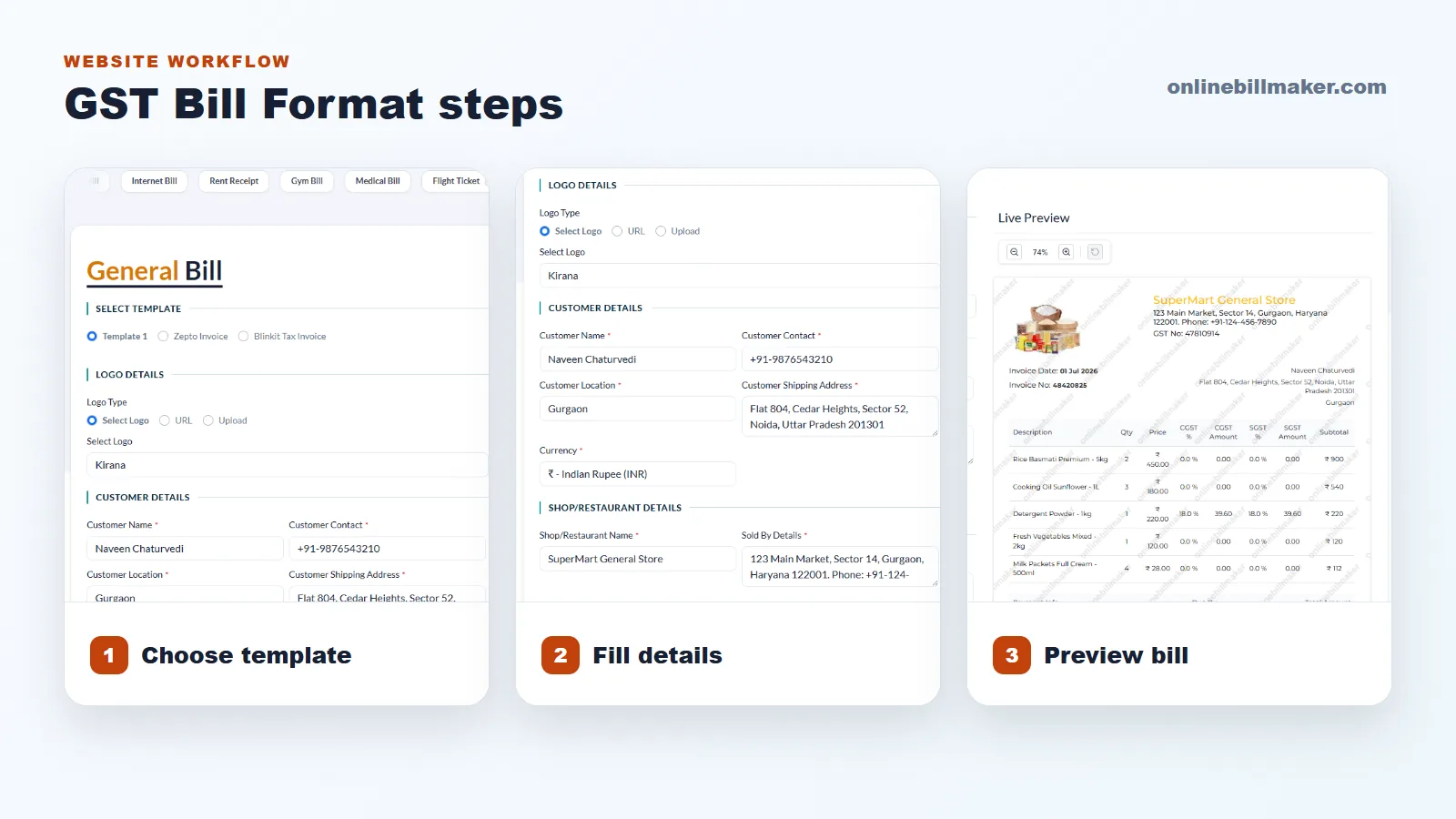
1. Open the GST bill or invoice template.
2. Enter seller and buyer details accurately.
3. Add invoice number, date and GSTIN fields where required.
4. Fill item descriptions, quantities, rates, value fields and tax breakup.
5. Check the preview for missing data, wrong totals or layout issues.
6. Download the PDF after reviewing the document carefully.
Mistakes to Avoid
Do not leave important fields blank just to finish quickly. Do not guess tax values. Do not reuse an old GST bill format without checking invoice number, date, customer name and item details.
Also avoid overloading one item row with long text. Use short item descriptions and put extra explanation in notes if the format allows it.