A quotation generator is an online tool that helps create price quotes or estimates with business details, customer details, items, pricing, validity and terms. It is useful before final billing because it gives the customer a clear cost summary for review and approval.
What is a Quotation Generator?
A quotation generator is a tool used to create price quotes before the final sale or invoice. It helps you present estimated costs in a professional format instead of sending informal messages.
A quotation usually explains what is being offered, the expected price, the validity of the quote and any important terms. It is not the same as a final invoice, but it helps move a customer decision forward.
Who Needs a Quotation Generator?
A quotation generator is useful for freelancers, contractors, agencies, suppliers, repair services, event planners, consultants, local businesses and service providers who discuss pricing before starting work.
It is also helpful for customers who need a written estimate before approval, budget confirmation or internal discussion.
Why a Professional Quotation Helps
A clear quotation can turn a casual enquiry into a serious business conversation. It shows that you understand the request and have organized the pricing properly.
When the quotation includes item pricing, terms and validity, customers can compare options and approve work faster. This reduces confusion later when the final invoice is prepared.
Details to Add to a Quotation
A strong quotation should include business details, customer details, quotation number, date, item or service list, quantity, rate, estimated amount, validity period, terms and notes.
Mentioning validity is important because prices can change. A quote without validity can create disagreement if material costs, service charges or availability changes later.
How OnlineBillMaker Helps
OnlineBillMaker helps users prepare quotation PDFs quickly with editable fields and live preview. You can enter pricing, add terms and download a neat quote for customers.
This is useful for small teams and freelancers who want to respond to enquiries faster without building a quote from scratch every time.
Steps to Create a Quotation Online
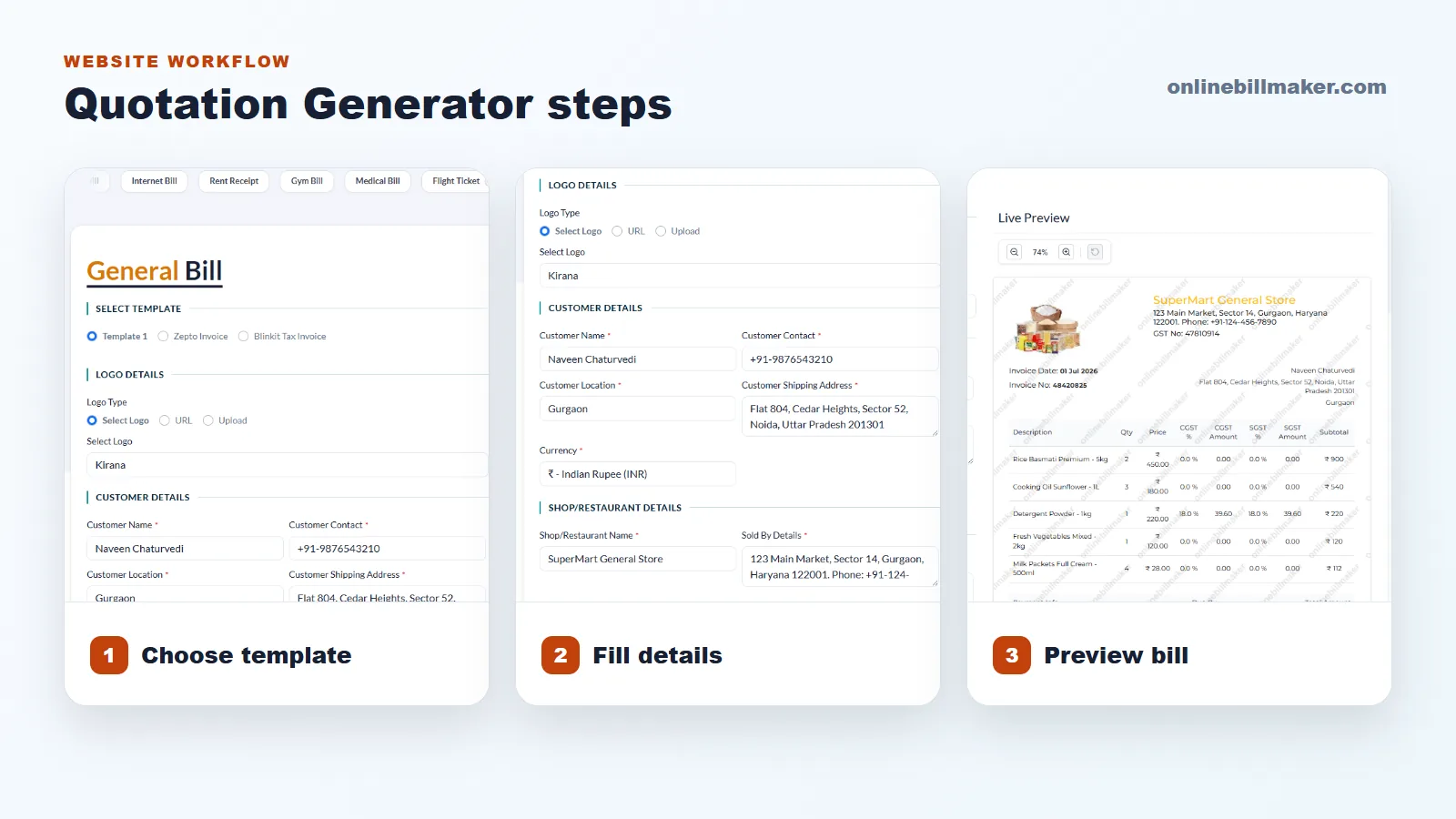
1. Choose a quotation or estimate template.
2. Add your business details and customer information.
3. Enter quoted items, quantities, rates and estimated totals.
4. Add validity period, terms, notes and contact details.
5. Review the preview to make sure the price and terms are clear.
6. Download the quotation PDF and share it with the customer.
Quotation Writing Tips
Keep the language simple and specific. Do not hide important conditions in vague notes. If the quote depends on final measurements, stock availability or customer approval, mention it clearly.
Once the customer approves the quotation, use it as a reference for the final invoice. This keeps the billing process smooth and reduces disputes.