An invoice generator PDF tool lets users create invoices online and download them as PDF files. It is useful for businesses, freelancers and service providers who need invoice documents that are easy to send, print, upload and store.
What is an Invoice Generator PDF Tool?
An invoice generator PDF tool is an online invoice maker that converts entered billing details into a downloadable PDF. You do not need to design tables or adjust spacing manually because the template handles the layout.
The PDF format is useful because it keeps the design stable. A customer opening the file on a mobile phone, laptop or printer sees the same invoice structure.
Who Needs PDF Invoices?
PDF invoices are useful for freelancers, consultants, agencies, online sellers, small businesses, product suppliers, local service providers and office teams. They are also helpful for users who need to attach billing documents to emails, messages or internal records.
If you regularly share payment details with customers, PDF invoices make communication clearer than sending plain text messages with amounts and bank notes.
Why PDF is Better for Sharing
A PDF invoice can be emailed, printed, downloaded, uploaded to portals and saved in folders without losing formatting. This makes it one of the most practical formats for billing communication.
It also helps customers store your invoice in their own records. When the document has a proper title, invoice number and date, both sides can find it again later.
Details to Add to an Invoice PDF
A useful invoice PDF should include business details, customer details, invoice number, invoice date, item or service description, quantity, rate, tax or extra charges where needed, total amount and payment notes.
Use short descriptions and avoid unclear item names. If an invoice needs extra explanation, add it as a note instead of making the item table hard to read.
How OnlineBillMaker Helps
OnlineBillMaker lets users choose an invoice format, add details, preview the layout and download a PDF. The workflow works well for people who want fast invoice creation without installing software.
The live preview is useful because you can see how the final PDF will look before downloading it. This helps catch spelling mistakes, long item text and missing totals.
Steps to Create an Invoice PDF Online
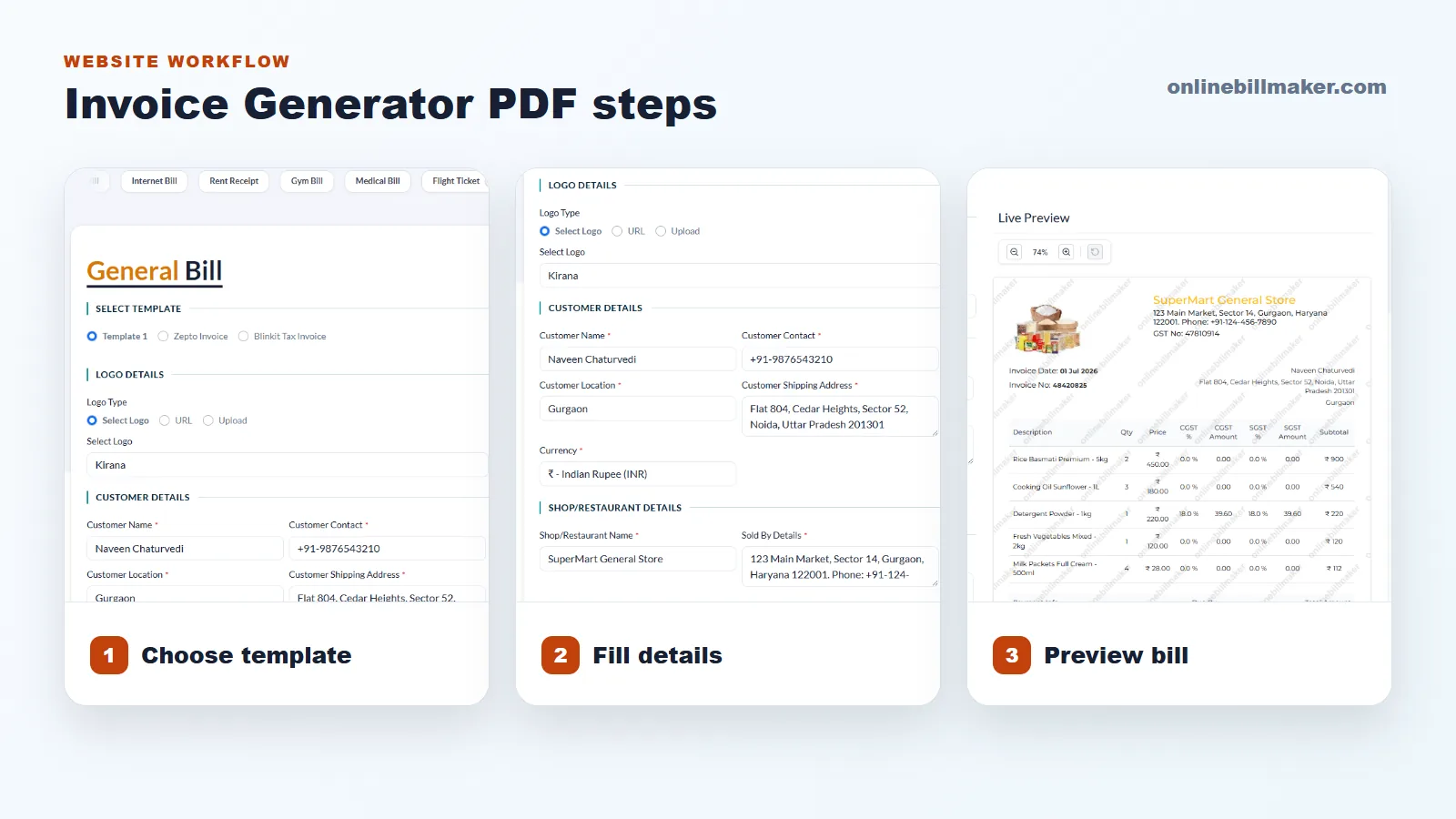
1. Select an invoice template that fits your billing need.
2. Enter your business details and customer information.
3. Add invoice number, date, item list, quantity, rate and total.
4. Add payment instructions, notes or terms if needed.
5. Review the invoice preview for layout and amount accuracy.
6. Download the final PDF and save it with a clear file name.
File Naming and Record Tips
Avoid saving every file as invoice.pdf. Use a naming style that includes customer name, invoice number and month. This makes old files easier to search when customers ask for a copy.
If you create invoices often, store them by year and month. A little organization now can save a lot of time during payment follow-up or record checks later.